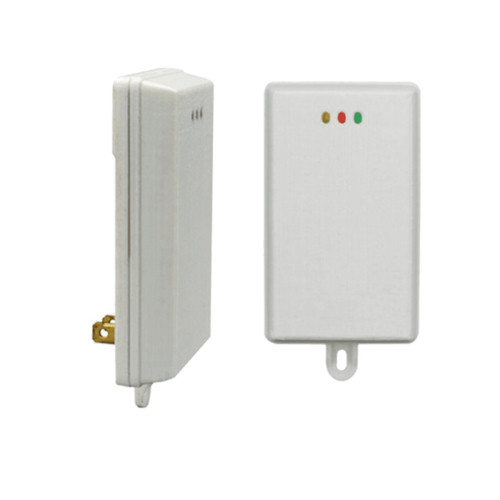
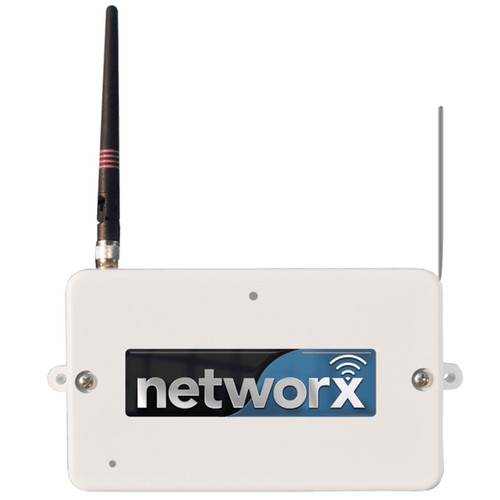
Alarm Lock Trilogy Networx WiF...
IN STOCK (leaves warehouse same day if ordered before 3pm ET)
$765.74
$355.66

Alarm Lock Trilogy Networx WiFi Gateway with 802.11 Network and AC Adapter - Version 3

(No reviews yet) Write a Review

Model: AL-IM3-80211

In Stock (leaves warehouse same day if ordered before 3pm ET)

$765.74
$355.66
Adding to cart… The item has been added
Free Shipping on orders over $199
We price match and offer bulk discounts! Click Add to Quote. It's quick and easy.
Earn points with this purchase! You can redeem points for giftcards, iPads, XBox's and more. View Rewards
Free Keying on all locks

Alarm Lock Trilogy Networx WiFi Gateway with 802.11 Network and AC Adapter - Version 3

Professional Wireless Access Control Network Gateway

The Alarm Lock Trilogy Networx AL-IM3-80211 Version 3 is a network gateway device designed for wireless lock system integration. This gateway combines with wireless wall-mounted and plug-in expanders to cover extensive building space with a single IP address. Features 500-foot clear field range to locks and supports up to 7 expanders for comprehensive coverage. Installation requires only RJ-45 Ethernet network cable or Wi-Fi connection and AC outlet access.

Professional Features & Benefits

  • Extended Range Coverage: 500-foot clear field range from gateway to locks with 175-foot radial coverage for expander placement ensures comprehensive building coverage.
  • Flexible Network Connectivity: Dual connection options including wired RJ-45 Ethernet network cable or Wi-Fi 802.11 network for versatile installation requirements.
  • Expandable System Architecture: Supports up to 7 wireless expanders (AL-IME2-EXP) per gateway with automatic identification and self-optimizing signal pathways.
  • Multi-Group Addressing: Total of 99 addressable groups supported through dual rotary switches for large-scale facility management.
  • Universal Compatibility: Compatible with Alarm Lock and Continental Access products for integrated access control solutions.
  • Automatic Network Discovery: DL-Windows software can automatically discover the gateway through network connection for simplified setup.
  • Cost-Effective Installation: Simpler wiring requirements compared to conventional gateways with elevated mounting recommendations 6 to 12 inches below standard 8-9 foot ceilings.
  • Self-Optimizing Performance: Networx system automatically determines optimal wireless signal pathways for reliable communication.

Technical Specifications

  • Network gateway for Networx lock systems
  • Expand your Networx lock system with up to 7 Expanders (AL-IME2-EXP) – Note expanders cannot communicate with older Gen 1 Gateways
  • Mount within 175 feet* (radially) from the intended wireless lock location(s)
  • Expanders should be mounted in elevated areas – recommended mounting position 6 to 12 in. below standard 8-9 foot ceiling
  • Cost-effective and easier to wire than conventional gateways
  • Networx system automatically identifies all newly powered Expanders and quickly self-determines the best wireless signal pathways
  • Each Gen. 3 Gateway and a maximum of seven (7) Expanders can be addressed as one group
  • Total of 99 addressable groups supported (addressable by two rotary switches)
  •  

Installation & Operation

  1. Verify network requirements match available infrastructure. Confirm RJ-45 Ethernet network cable access or Wi-Fi 802.11 network availability and AC outlet proximity.
  2. Mount the gateway within 175 feet radially from intended wireless lock locations in an elevated area 6 to 12 inches below standard 8-9 foot ceiling height.
  3. Connect network cable to RJ-45 Ethernet port or configure Wi-Fi 802.11 network connection according to network specifications.
  4. Connect AC adapter to appropriate power outlet and verify gateway power indicator status.
  5. Configure addressable group settings using dual rotary switches for proper system identification within the 99-group capacity.
  6. Use DL-Windows software to discover and configure the gateway through network connection, verifying communication with intended wireless locks.
  7. Test wireless communication range and signal strength to all connected locks and expanders. Refer to manufacturer documentation for complete installation procedures and troubleshooting guidance.

Professional Applications

  • Commercial Building Access Control Systems
  • Educational Facility Security Networks
  • Healthcare Institution Access Management
  • Multi-Tenant Residential Properties
  • Industrial Facility Monitoring Systems
  • Government and Municipal Buildings
  • Corporate Campus Security Integration

Why Choose Alarm Lock Quality?

Alarm Lock Trilogy Networx gateway systems deliver professional-grade wireless access control with automatic signal pathway optimization and expandable architecture supporting up to 7 expanders per gateway. The self-identifying system design and 500-foot clear field range ensure reliable performance in demanding commercial applications. Engineered for cost-effective installation with simplified wiring requirements compared to conventional gateway systems.

Product Specs

Product Type:
Gateway
Subcategory:
Accessories
Product Group:
Parts and Accessories
Product Category:
Parts and Accessories
Department:
Door Hardware
Product Subgroup:
Parts and Accessories

Alarm Lock AL-IM3-80211 – Frequently Asked Questions

1) How far can the Alarm Lock AL-IM3-80211 gateway be from the Trilogy Networx locks it talks to?
The AL-IM3-80211 Gen 3 gateway has a 500 foot clear field range to the locks, but the practical mounting rule is different: put the gateway (or an expander) within 175 feet radially of the wireless locks it needs to reach. Clear field means line of sight with nothing in between, so in a building with block walls, elevator shafts, or metal studs you plan to the 175 foot radial figure and add expanders to cover the rest.
2) Can I add expanders to a Trilogy Networx gateway to cover a bigger building, and how many?
Up to seven AL-IME2-EXP expanders work with one Gen 3 gateway, and the gateway plus those seven are addressed together as a single group. The Networx system identifies newly powered expanders automatically and works out the best signal pathways itself, so you are not hand-mapping routes. Each expander needs to sit within 175 feet radially of the locks it serves. That is how one IP address ends up covering a whole floor plate or a multi building campus.
3) Will AL-IME2-EXP expanders work with the older Alarm Lock Networx gateway I already have?
No. The AL-IME2-EXP expanders cannot communicate with older Gen 1 gateways. If you are running a first generation Networx gateway and want to extend coverage with expanders, you need the Gen 3 gateway, model AL-IM3-80211, as the head end. This is the single most common mistake on a Networx expansion order, so check which generation is on the wall before you buy expanders.
4) Does the Alarm Lock Networx Gen 3 gateway need a network drop, or can it run on Wi-Fi?
Either. The AL-IM3-80211 takes an RJ-45 Ethernet cable or joins an 802.11 Wi-Fi network, so you can put it where the coverage needs to be rather than where the data drop happens to be. All it needs at the mounting point is the network connection you choose plus an AC outlet, and the AC adapter comes with it. For a retrofit in an occupied building with no spare drops, the Wi-Fi path is usually what makes the install possible.
5) How many gateways do I need for a multi-story building with Trilogy Networx locks?
Work it from the 175 foot radial rule, not the 500 foot clear field number. Each Gen 3 gateway covers its own radius and then carries up to seven AL-IME2-EXP expanders, each of which also has to land within 175 feet radially of the locks it serves, so one gateway group can blanket a large footprint. Where a floor plate or a separate wing falls outside what one gateway and seven expanders can reach, add another gateway and give it its own group address; the system supports 99 groups.
6) Where should a Networx gateway and its expanders be mounted in the building?
High. Mount them in an elevated position, 6 to 12 inches below a standard 8 to 9 foot ceiling, and keep the unit within 175 feet radially of the locks it serves. Elevating the units gets the antenna above furniture, racking, and partitions, which is what the range figures assume. Plan the AC outlet and the network path at that height before you set the location, because the gateway needs both at the mounting point.
7) How many separate Networx gateway groups can one system have?
99 addressable groups total, set with two rotary switches on the unit. Each group is one Gen 3 gateway plus up to seven expanders. For a large campus or a multi building portfolio, that is how you keep the wireless segments from colliding: give each gateway cluster its own group address on the rotary switches during commissioning.
8) Is this gateway the lock itself, or something I add to locks I already have?
The AL-IM3-80211 is the network bridge, not a lock. It is the box on the wall that puts your Trilogy Networx wireless locks on the network under a single IP address so they can be programmed and monitored from DL-Windows instead of walking to each door with a laptop. You still buy the Networx locks separately; the gateway (and its expanders) is the infrastructure that connects them.
9) Does the Alarm Lock Networx gateway work with Continental Access systems?
Yes, the Gen 3 Networx gateway is compatible with Alarm Lock and Continental Access products, so a facility already running Continental Access control can bring Trilogy Networx wireless openings onto the same integrated system rather than standing up a second platform for the wireless doors.
How fast can I get the Alarm Lock AL-IM3-80211 delivered?
Most orders ship the same day from our distribution partners, with quick delivery throughout the continental U.S. Need it urgently? Contact Us for expedited shipping options.
Can I return it if it doesn’t work for me?
Yes—ZenSupply offers a hassle-free return policy. If the product isn’t the right fit, reach out to our support team for a return authorization or setup a return by following our return instructions.
Does the Alarm Lock AL-IM3-80211 come with a warranty?
Absolutely. The Alarm Lock AL-IM3-80211 is backed by a manufacturer’s warranty. For full warranty terms, check the product documentation or Contact Us.
How do I get technical support or installation help for the Alarm Lock AL-IM3-80211?
You can call, text, or email our expert support team for fast answers. We’re here to help with product selection, installation tips, and troubleshooting. Contact Us
Why buy the Alarm Lock AL-IM3-80211 from ZenSupply?
ZenSupply makes it easy to get the commercial door hardware you need—fast shipping, expert support, and rewards on every order. Our team is always ready to help you choose the right product for your project.