


You may also like


Kaba Acccess 3000 Series Complete Mounting Plate Assembly
Model: 3040
Construction: All metal cast front housing, force-resistant, clutch-protected fixed thumbturn
Numeric Keypad: Vandal resistant, solid metal pushbuttons
Locking Device: Adams Rite 4510/4710/4910...
Dormakaba
Starting at
$99.00
$64.06

Package Includes
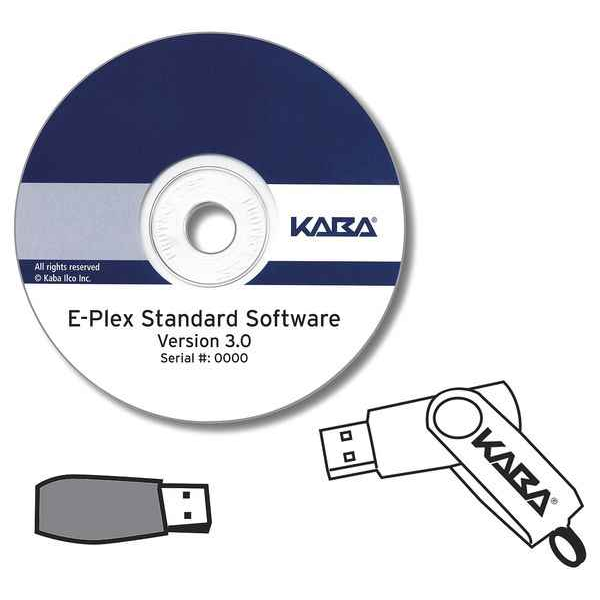
- Software Disc – Requires Microsoft Excel
- Installation Instructions
- M-Unit
- IR Reader and Extension Cable
- USB Cable to Program EPS2000
Features
- Includes the IrDA > USB adaptor and software to enable communication between a Windows based laptop or netbook PC and your E-Plex 1500/2000/3000/5000 locks
- User-friendly interface with point and click control
- On-screen instructions with a spreadsheet design that enables you to sort how you see fit
- Manage up to 300 users per door
- Manage up to 10,000 doors / multiple locations
- Most recent 9,000 lock events are recorded in memory including use of the mechanical key override for audit trail reporting
- Quickly add/delete users/doors
- Built-in optional random PIN-code generator
- Passwords safeguard data and system
Technical Information
- Compatible with Microsoft Windows 2000, XP Home & Pro, Vista, Windows 7, and Windows 8. PC memory requirements: 128 MB (mega-bytes) or greater of RAM, 500 MB or greater of Hard Disk
- PC/PDA running Excel 2003 or higher is required
- PDA and Pocket PC Compatibility: PDA’s running Palm Operating System 4.X or 5.X – Palm Centro, Tungsten E, Tungsten E2, Tungsten T3, T5, TX, Palm Zire, Palm Zire 21, Palm Zire 31, Palm Zire 71, Palm Zire 72, Palm M Series (130/500/505/515), Sony Clie Series (TJ/25/35/37). Pocket PC’s running Windows Mobile OS 5.0 or higher – HP IPAQ Series, Dell Axim Series
- Mobile phones running Windows OS (operating system) ‘and’ phone must have ‘beaming’ capability, i.e. infrared sensor
Manufacturer Resources
Product Specs
- Product Group:
- Electronic Access Controls
- Product Subgroup:
- Software
- Product Type:
- Software
- Commercial/Residential:
- Commercial
- Electronic:
- Yes
- Subcategory:
- Software
- Parts and Accessories Type:
- Installation Accessories
- Product Attribute:
- Parts and Accessories
- Product Category:
- Electronic Access Controls
- Department:
- Door Hardware
Dormakaba EP-STD-03-001 – Frequently Asked Questions
1) Which E-Plex locks does the Kaba Access E-Plex 3000/5000 Software 3.1 kit program?
The Software 3.1 kit communicates with E-Plex 1500, 2000, 3000 and 5000 locks. The IrDA to USB adaptor included in the package is what links a Windows laptop or netbook to those locks, and the USB cable in the kit is what programs an EPS2000.
2) What comes in the box with the E-Plex 3.1 software kit, or do I need to buy the IR reader separately?
Everything needed to talk to the locks is in the kit: the software disc, installation instructions, the M-Unit, an IR reader with extension cable, and the USB cable for programming an EPS2000. No separate adaptor purchase is needed. What is not included is Microsoft Excel, which the software requires to run.
3) Will the Kaba E-Plex 3.1 software run on my office PC?
It runs on Microsoft Windows 2000, XP Home and Pro, Vista, Windows 7 and Windows 8, with at least 128 MB of RAM and 500 MB of hard disk space. Excel 2003 or higher has to be installed on the machine as well, since the interface is built on a spreadsheet. If your facility has moved to newer Windows releases than those listed, plan on keeping a dedicated machine for programming.
4) Can I pull an audit trail off an E-Plex lock with this software, and does it show mechanical key use?
Yes. The most recent 9,000 lock events are held in memory and can be read out for audit trail reporting, and that record includes uses of the mechanical key override, not just keypad entries. That is the detail institutional and multi-family buyers usually want, since a door opened by key otherwise leaves no trace.
5) How many doors and users can the E-Plex 3000/5000 software handle across a portfolio?
Up to 300 users per door, and up to 10,000 doors spread across multiple locations. For a property manager running several buildings off one database, that is the ceiling to plan against.
6) Can I program E-Plex locks from a handheld instead of carrying a laptop to each door?
Yes, within the devices the software supports. It works with PDAs running Palm OS 4.X or 5.X (Palm Centro, Tungsten E, E2, T3, T5, TX, Zire, Zire 21/31/71/72, Palm M Series 130/500/505/515, Sony Clie TJ/25/35/37) and Pocket PCs running Windows Mobile 5.0 or higher such as the HP iPAQ and Dell Axim series. Mobile phones work only if they run Windows OS and have infrared beaming capability. Excel 2003 or higher is required on the handheld too.
7) Is this Kaba E-Plex software meant for commercial buildings or home use?
It is a commercial access control package, sold as an installation accessory for E-Plex electronic locks. The scale gives it away: 10,000 doors across multiple sites with password-protected data is a facility and portfolio tool, not something a single-home owner needs.
8) Does the E-Plex software generate PIN codes for me, or do I have to assign every code by hand?
There is a built-in random PIN code generator you can use instead of assigning codes yourself, and it is optional, so manual assignment still works if you standardize codes by tenant or staff role. Users and doors can be added or deleted quickly, and the spreadsheet layout lets you sort the list however you want to review it. Passwords protect the data and the system itself.
9) What model number should I order for the Kaba E-Plex 3000/5000 Software 3.1?
Order it as Dormakaba model EP-STD-03-001, the Kaba Access E-Plex 3000/5000 Software 3.1 kit. That is the only configuration, so there are no finish, handing, or version options to specify.
How fast can I get the Dormakaba EP-STD-03-001 delivered?
Most orders ship the same day from our distribution partners, with quick delivery throughout the
continental
U.S.
Need it urgently? Contact Us for expedited shipping options.
Can I return it if it doesn’t work for me?
Yes—ZenSupply offers a hassle-free return policy. If the product isn’t the right fit,
reach out to our support team for a return authorization or setup a return by following our return instructions.
Does the Dormakaba EP-STD-03-001 come with a warranty?
Absolutely. The Dormakaba EP-STD-03-001 is backed by a manufacturer’s warranty.
For full warranty terms, check the product documentation or Contact Us.
How do I get technical support or installation help for the Dormakaba EP-STD-03-001?
You can call, text, or email our expert support team for fast answers. We’re here to help with
product
selection,
installation tips, and troubleshooting. Contact Us
Why buy the Dormakaba EP-STD-03-001 from ZenSupply?
ZenSupply makes it easy to get the commercial door hardware you need—fast shipping, expert support,
and
rewards on
every order.
Our team is always ready to help you choose the right product for your project.