Dormakaba CEIPRF6000 RFID Comm...
IN STOCK (leaves warehouse same day if ordered before 3pm ET)
$1,590.00
$1,260.85

Dormakaba CEIPRF6000 RFID Community Encoder

(1 review) Write a Review

Model: CEIPRF6000

In Stock (leaves warehouse same day if ordered before 3pm ET)

$1,590.00
$1,260.85
Adding to cart… The item has been added
Free Shipping on orders over $199
We price match and offer bulk discounts! Click Add to Quote. It's quick and easy.
✨
Earn points with this purchase! You can redeem points for giftcards, iPads, XBox's and more. View Rewards
Free Keying on all locks

Dormakaba CEIPRF6000 RFID Community Encoder

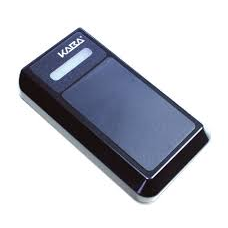
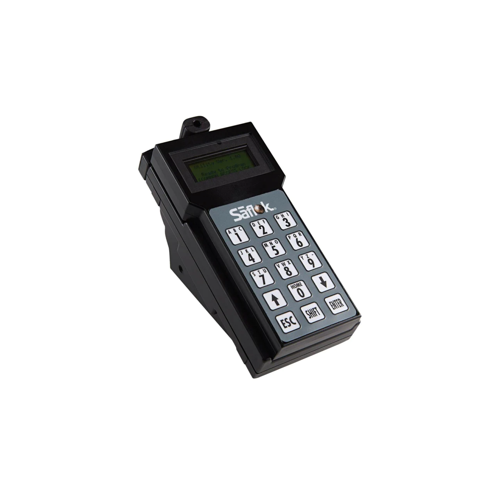
Dormakaba’s RFID encoder is a vital component that operates with the Saflok access management platforms to authorize access throughout the property.
It encodes RFID keycards and other media with data & commands for both guest and staff level access. A choice of USB or network connectivity enhances both front desk efficiency and employee convenience.

Applications

• Suitable for all hotel sizes
• Encodes a variety of RFID accessories including keycards, fobs and wristbands • Encodes access to guest rooms, common areas and back-of-house.

Features:

• Securely encodes keycards and accessories
• Power source: USB interface (5V) or Power over Ethernet (PoE)
• TCP/IP interface to connect directly to an Ethernet Network (no software to install on the client workstation) • Support RFID keycards or tags (ISO 14443-A)
• Supports Mifare Classic (Mini, 1K, 4K), Mifare Plus (1K,2K,4K) and Ultralight C credentials.

Access Management Platforms

The RFID encoder works with both dormakaba’s stand-alone devices and robust access management software solutions that features an array of access control workflows for both guest and staff access.

RFID electronic locks

• Saflok Quantum RFID Series • Saflok RT
• Saflok MT RFID • Confidant RFID

Physical Characteristics

USB 2.0 Full Speed Device Interface (micro type B)
10/100 Mbit Ethernet Interface (RJ-45)
Dimensions: 3.15W x 0.97H x 5.37L inches (80W x 25H x 137L mm) Weight: 0.275 lbs (0.124kg)
Operation LED
Audio Indicator

Power Source

USB Interface (5V) or Power over Ethernet (PoE)

Environmental Operating Conditions

Temperature: 0oC to 50oC (32oF to 122oF) Relative humidity: 0% to 95% non-condensing

Certifications, Approvals and Testing

RoHS Compliant Complies with FCC part 15C class A and RSS 210 Complies with CE Harmonized EN under article 3.2 of the R&TTE Directive

Warranty

2 years
Support Progam: dormakaba Service Plans available

Manufacturer Resources

Product Specs

Product Group:
Electronic Access Controls
Product Subgroup:
Readers, Keypads and Credentials
Product Type:
Readers
Department:
Door Hardware

Dormakaba CEIPRF6000 – Frequently Asked Questions

1) Will the Dormakaba CEIPRF6000 encoder work with the Saflok locks already installed at our property?
The CEIPRF6000 is built for the Saflok platform. Dormakaba lists it as working with Saflok Quantum RFID Series, Saflok RT, Saflok MT RFID and Confidant RFID electronic locks, and it operates with the Saflok access management platforms that authorize access throughout the property. It works with both dormakaba stand-alone devices and the access management software, so one unit covers guest rooms, common areas and back-of-house openings. If your locks are RFID Saflok or Confidant RFID, this is the encoder that writes their credentials.
2) Which RFID cards can the CEIPRF6000 encode? We already buy Mifare 1K stock.
Mifare Classic (Mini, 1K and 4K), Mifare Plus (1K, 2K and 4K) and Ultralight C credentials are all supported, so Mifare Classic 1K card stock is directly in scope. More broadly, the encoder writes RFID keycards or tags built to ISO 14443-A. A credential outside that family is not something this unit is stated to handle, so check the chip type on your card order, not just the printing on the card.
3) Can a Dormakaba RFID encoder write the 125 kHz proximity cards our staff already carry?
No. The CEIPRF6000 handles ISO 14443-A credentials, which is 13.56 MHz RFID, along with Mifare Classic, Mifare Plus and Ultralight C. 125 kHz proximity is a different frequency and a different credential technology, and it is not in what this encoder supports. Properties running 125 kHz prox are on a separate ecosystem entirely: that credential is read at the opening by a multi-technology device such as the Schlage Electronics MTK15 networked reader with keypad, which reads 125 kHz proximity cards and PIN credentials. Moving to the Saflok RFID platform means moving the credential stock too.
4) Is the Dormakaba CEIPRF6000 a door reader or a front desk unit?
Front desk unit. The CEIPRF6000 is an encoder: it writes data and commands onto RFID keycards and other media for guest and staff level access. It does not mount at an opening and it does not control a door. If what you actually need is a credential reader at a door, that is a different class of device, for example the Schlage Electronics MTKB15 single-gang mount mobile-enabled multi-technology reader with keypad, or the Securitron R100 surface mounted wireless card reader. Buying an encoder when the job calls for a door reader is the most common mix-up on this kind of hardware.
5) Do I have to install software on the front desk workstation to run the CEIPRF6000 encoder?
Not on the network side. The CEIPRF6000 has a TCP/IP interface that connects directly to an Ethernet network over 10/100 Mbit (RJ-45) with no software to install on the client workstation. The other option is the USB 2.0 Full Speed device interface, a micro type B connection to the workstation. Pick the network path when you want the encoder shared across stations without touching each PC, and USB when it sits at one desk beside one terminal.
6) Does the CEIPRF6000 need its own power supply, or does it run off the cable?
No separate power brick either way. The encoder draws power from the USB interface at 5V, or from Power over Ethernet when it is run on the network. So the cable that carries the data carries the power: a micro type B USB lead to the workstation, or an RJ-45 run from a PoE switch or injector. That matters when you are siting an encoder at a desk with no free outlet, or at a satellite check-in station where the only thing already run is data cable.
7) I need something that reads a card at the door, not something that programs cards. What should I be looking at instead of the CEIPRF6000?
The CEIPRF6000 is an encoder that lives at a workstation on USB or PoE and writes credentials; it is not mounted at an opening. For reading a credential at the door, the Schlage MTK15 is a networked multi-technology reader with keypad for wall mounting that accepts PIN credentials and 125 kHz proximity cards. The Schlage MTK15-485 is the same reader with keypad in an RS-485 capable version. The Schlage MTKB15 is a mobile-enabled multi-technology reader with keypad in black for a single-gang mount. The Securitron R100 is a surface mounted wireless card reader in the RH100 Series. All four are door-side readers; the encoder is the desk-side device that issues the media they read.
8) Can a Schlage MTK15 reader be used in place of the Dormakaba CEIPRF6000 encoder?
No - the two parts do different jobs in an access control system. The CEIPRF6000 encodes RFID keycards, fobs and wristbands with the data and commands that authorize guest and staff access, and it works with the Saflok access management platforms and Saflok Quantum RFID, Saflok RT, Saflok MT RFID and Confidant RFID locks. It sits at a front desk or back office on a USB 2.0 micro type B connection or a PoE Ethernet drop. The Schlage MTK15 is a networked multi-technology reader with keypad for wall mounting that takes PIN credentials and 125 kHz proximity cards at the opening itself. A reader authenticates a credential at the door; the CEIPRF6000 creates the credential before it ever reaches the door, so the MTK15 cannot take over that step.
9) Our doors already have Schlage MTK15 readers on them. Will the Dormakaba CEIPRF6000 encode cards we can use with those?
The CEIPRF6000 writes ISO 14443-A RFID keycards and tags, including Mifare Classic Mini, 1K and 4K, Mifare Plus 1K, 2K and 4K, and Ultralight C, and what it writes onto them is Saflok access management platform data for guest and staff access on Saflok Quantum RFID, Saflok RT, Saflok MT RFID and Confidant RFID locks. The Schlage MTK15 is a networked multi-technology reader with keypad that takes PIN credentials and 125 kHz proximity cards, and it belongs to the Schlage side of the system. A door population running MTK15 readers is credentialed through the Schlage platform those readers report to, so the CEIPRF6000 is the right encoder when the locks are Saflok, not when the openings are on Schlage readers.
10) We want residents to use their phones for entry instead of carrying keycards. Is an RFID encoder the right part?
The CEIPRF6000 exists to write physical media - it encodes RFID keycards, fobs and wristbands with guest and staff access data for the Saflok platforms, and supports ISO 14443-A keycards and tags. If the credential is going to live on a phone rather than on a card, the reading device at the opening has to handle it: the Schlage MTKB15 is a mobile-enabled multi-technology reader with keypad, in black, that mounts to a single-gang box. Properties that issue both often run cards and phones side by side, in which case the encoder covers the card and fob population and a mobile-enabled reader covers the phone population.
11) Can this Dormakaba encoder write fobs and wristbands, or only flat keycards?
Both. The CEIPRF6000 encodes a range of RFID accessories including keycards, fobs and wristbands, so a resort issuing wristbands at a pool or waterpark and cards at the front desk uses the same unit for both. The limit is the chip, not the shape: the media has to be ISO 14443-A, and the supported chip families are Mifare Classic (Mini, 1K, 4K), Mifare Plus (1K, 2K, 4K) and Ultralight C.
12) Can one encoder handle staff keys as well as guest room keys?
Yes, one CEIPRF6000 covers both. It encodes media with data and commands for guest level and staff level access, and the access it writes spans guest rooms, common areas and back-of-house. Housekeeping, engineering and management credentials come off the same unit as the arriving guest's room key, which is why properties commonly put one at the front desk and another wherever staff credentials get issued.
13) There is no pathway to pull cable to this opening. What reader works there if the CEIPRF6000 cannot?
The CEIPRF6000 needs a wired connection either way - a USB 2.0 micro type B lead to a workstation or a 10/100 Mbit Ethernet RJ-45 run that also carries its PoE power - which is why it stays at the desk rather than at the door. Where pulling reader cable to the opening is not practical, the Securitron R100 is a surface mounted wireless card reader in the RH100 Series, and surface mounting means no back box cut into the wall or frame. The Schlage MTKB15, by contrast, mounts to a single-gang box, so it assumes a box and a pathway are already there.
14) Is there a way to control an entry without issuing and encoding cards at all?
Encoding is the path when the credential is a physical card, fob or wristband - the CEIPRF6000 writes those for the Saflok platforms over USB or PoE, and every new user means a card gets encoded. If the goal is to skip the credential entirely, the Schlage MTK15 is a networked reader with keypad that accepts PIN credentials, and the MTK15-485 is the same reader with keypad in an RS-485 capable version. A PIN-based opening is administered by issuing a code rather than by encoding media, which changes what a front desk or property office has to keep on hand.
15) Our access panel runs an RS-485 bus. Does the CEIPRF6000 land on that bus, and if not what does?
The CEIPRF6000 connects two ways: a USB 2.0 full speed device interface using micro type B, or a 10/100 Mbit Ethernet RJ-45 interface that ties it straight into a TCP/IP network with no software to install on the client workstation. It is an encoder addressed over USB or Ethernet, not a device that sits on a reader bus. For readers that need to land on an RS-485 bus, the Schlage MTK15-485 is the RS-485 capable version of the MTK15 networked multi-technology reader with keypad, wall mount, taking PIN credentials and 125 kHz proximity cards. Specifying the -485 version matters at order time because the base MTK15 is the same reader without that capability called out.
16) We run a small 40-room property. Is the CEIPRF6000 encoder oversized for us?
It is stated as suitable for all hotel sizes, so a small property is a normal application. Scale is handled by how many you deploy rather than by a different model: the network version connects straight to your Ethernet with nothing installed on the workstation, so adding a second encoder at a satellite desk or a back office is a cable run and a network address, not another PC build. A single-desk property can run one unit on USB and be done.
17) How much desk space does the Dormakaba CEIPRF6000 take up at a check-in counter?
The encoder measures 3.15W x 0.97H x 5.37L inches (80W x 25H x 137L mm), so it sits under an inch tall and takes a strip of counter about the footprint of a card terminal. Low enough to keep sightlines clear across a check-in desk, and small enough to tuck beside a monitor stand. Cabling exits as either a micro type B USB lead or an RJ-45, both of which also carry its power.
18) Can the CEIPRF6000 be installed in an unconditioned back office or a humid coastal property?
Operating range is 0 to 50 degrees C (32 to 122 degrees F) with relative humidity of 0 to 95 percent non-condensing. That covers a warm back office or a humid coastal lobby, but non-condensing is the operative word: a location where moisture actually forms on surfaces, such as an open-air pool building, is outside what the encoder is rated for. Keep it indoors and out of direct condensation.
19) What certifications does the Dormakaba CEIPRF6000 carry for a spec submittal?
The encoder is RoHS compliant, complies with FCC part 15C class A and RSS 210, and complies with CE Harmonized EN under article 3.2 of the R&TTE Directive. That is the RF and materials compliance package, which is what most institutional and hospitality submittals are asking for on a desktop encoding device.
20) How does a front desk agent know a card actually encoded on the CEIPRF6000?
The unit has an operation LED and an audio indicator, so the agent gets visual and audible confirmation at the moment of encoding rather than having to watch the screen. Useful on a busy desk where the terminal is turned away from the agent or a queue is moving fast.
How fast can I get the Dormakaba CEIPRF6000 delivered?
Most orders ship the same day from our distribution partners, with quick delivery throughout the continental U.S. Need it urgently? Contact Us for expedited shipping options.
Can I return it if it doesn’t work for me?
Yes—ZenSupply offers a hassle-free return policy. If the product isn’t the right fit, reach out to our support team for a return authorization or setup a return by following our return instructions.
Does the Dormakaba CEIPRF6000 come with a warranty?
Absolutely. The Dormakaba CEIPRF6000 is backed by a manufacturer’s warranty. For full warranty terms, check the product documentation or Contact Us.
How do I get technical support or installation help for the Dormakaba CEIPRF6000?
You can call, text, or email our expert support team for fast answers. We’re here to help with product selection, installation tips, and troubleshooting. Contact Us
Why buy the Dormakaba CEIPRF6000 from ZenSupply?
ZenSupply makes it easy to get the commercial door hardware you need—fast shipping, expert support, and rewards on every order. Our team is always ready to help you choose the right product for your project.

Product Reviews

  • 5
    Dormakaba CEIPRF6000 RFID Community Encoder

    Posted by Travis on Jun 25th 2024

    The setup took a while, but once it was up and running, it worked like a charm.