


You may also like

Aiphone AC-BT-M Mullion-Mount Bluetooth and NFC Reader with Wiegand Connection
Model: AIP-AC-BT-M
Aiphone AC-BT-M Mullion-Mount Bluetooth and NFC Reader with Wiegand ConnectionThe Aiphone AC-BT-M is a mullion-mount Bluetooth® and NFC™ reader engineered for commercial electronic access control...
Aiphone
$466.00
$354.14


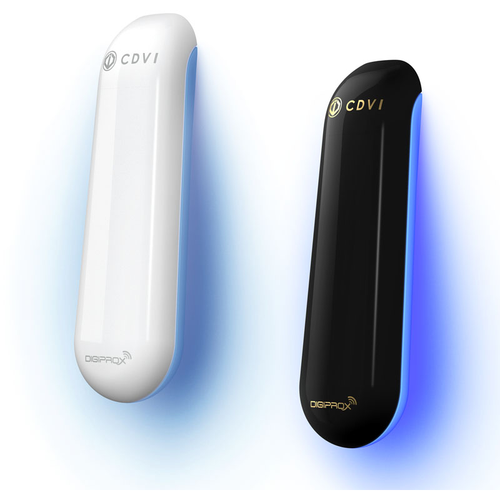
CDVI Americas STARPB Prox Reader/Mullion/Wiegand/125khz/Black
Model: CDVSTARPB
CDVI Americas STARPB Prox Reader/Mullion/Wiegand/125khz/Black
CDVI proximity card readers are recognized worldwide, having won several awards for their innovative design. CDVI has a full and varied...
CDVI
$228.00
$140.00
Dormakaba RNSC2/RNFC2 BLE Mullion and Flush Mount Reader
The Dormakaba RNSC2 (surface/mullion mount) and RNFC2 (flush mount) are Wiegand credential readers with an integrated BLE module and rear mounting plate in a single unit. Built for lodging and multi-housing access control systems, both models read the dormakaba 17-byte physical credential format and support mobile access via the dormakaba BLE App, providing a straightforward upgrade path for properties moving toward mobile credentials.
Key Features
- Available in mullion-style surface mount (RNSC2) and flush mount (RNFC2) form factors
- Integrated BLE module and rear mounting plate included
- Reads dormakaba lodging and multi-housing 17-byte physical credential format
- Supports BLE mobile credential access via dormakaba app
- Wiegand standard output, compatible with existing Wiegand infrastructure
- Terminal strip connection on back of reader for clean, reliable wiring
- Standard maximum cable run: 500 ft using 6-conductor reader cable
Compatibility and Requirements
- Compatible ACUs: CA150, CA250, CA4500, CA8500
- Requires ACU reader firmware CF10004 or CF10010
- Not compatible with elevator ECUs
- Power: 12 VDC @ 200 mA
Manufacturer Resources
Product Specs
- Product Group:
- Electronic Access Controls
- Product Subgroup:
- Readers, Keypads and Credentials
- Application:
- Multihousing or Lodging Access Control; Back-of-the-House Applications
- System Interfaces:
- Wiegand
- Product Type:
- Readers
- Installation Category:
- Surface
- Department:
- Door Hardware
Dormakaba COMMSRKRNSC2 – Frequently Asked Questions
1) Will the Dormakaba RNSC2 reader work with my CA150 access control panel?
Yes. The RNSC2/RNFC2 mullion reader works with the CA150, CA250, CA4500 and CA8500 ACUs, but the panel has to be running reader firmware CF10004 or CF10010. Check the firmware level on the ACU before you order, because that is the piece that usually blocks a retrofit rather than the wiring. One exception worth knowing up front: it will not work on elevator ECUs.
2) Can I use this Dormakaba BLE reader for elevator access control?
No. The RNSC2/RNFC2 reader is not compatible with elevator ECUs, so it cannot be used for cab or landing call control. It is built for door openings on lodging and multi-housing systems and back-of-house applications running on the CA150, CA250, CA4500 or CA8500 ACUs.
3) How far can I run the cable from the reader back to the panel?
500 feet is the standard maximum run, using 6-conductor reader cable. The reader lands on a terminal strip on the back of the unit, and it draws 12 VDC at 200 mA, so size your supply for that load across however many readers share it.
4) Do I have to reissue keycards to move my property to phone-based access?
No. The RNSC2 reads the dormakaba 17-byte lodging and multi-housing physical credential format and also accepts mobile credentials through the dormakaba BLE app, both in the same unit. Existing cards keep working while you roll phones out to guests or residents at whatever pace suits the property.
5) Can I wire this Dormakaba BLE reader into my existing Wiegand system?
Yes. Output is standard Wiegand, so it drops onto existing Wiegand reader wiring and panel inputs. Connections are made at a terminal strip on the back of the reader. The panel still has to be a CA150, CA250, CA4500 or CA8500 with CF10004 or CF10010 reader firmware for the credentials to be processed.
6) Will this reader accept my existing dormakaba guest room keycards?
It reads the dormakaba lodging and multi-housing 17-byte physical credential format, so cards already encoded in that format on your property work as they do now. The application is lodging and multi-housing access control plus back-of-house openings, which is where those credentials live.
7) What is the closest mobile-credential reader to the Dormakaba RNSC2 if the job is standardized on Schlage?
The Schlage Electronics MTKB15 is the nearest counterpart. It is a mobile-enabled multi-technology reader with keypad in a single-gang mount, finished black. Both it and the RNSC2 support a phone-based credential alongside a physical card, so a property moving to mobile access can go either way. The differences to plan for are the interface and the head end: the RNSC2 is a Wiegand-output reader that runs on Dormakaba CA150, CA250, CA4500 and CA8500 access control units and reads the Dormakaba 17-byte lodging and multi-housing credential format, so its mobile side comes through the Dormakaba app. The MTKB15 also adds a keypad, which the RNSC2 does not carry, and its single-gang body needs a gang box or a mounting surface wide enough for it, where the RNSC2 is a mullion-style surface unit with the rear mounting plate included.
8) Our controller wants RS-485 rather than Wiegand - is the Dormakaba RNSC2 the right reader?
No. The RNSC2 is a Wiegand-output reader, which is what makes it a drop-in on existing Wiegand wiring back to a Dormakaba CA150, CA250, CA4500 or CA8500 controller, but it is the wrong device for a panel that expects RS-485. For that, the Schlage Electronics MTK15 RS-485 capable version is the direct answer - same networked multi-technology wall mount reader with keypad, PIN credentials and 125 kHz proximity card reading, with RS-485 capability. Decide the interface first, because it drives the cable and the panel, not just the reader.
9) Is the Securitron R100 a substitute for the Dormakaba RNSC2 since both are surface mount readers?
They look alike on the wall and are not interchangeable. The Securitron R100, in the RH100 series, is a surface mounted wireless card reader - the wireless link is the point of it, which is why it gets used where pulling reader cable to the door is the problem. The RNSC2 is a wired Wiegand reader with a terminal strip on the back of the unit and a standard maximum run of 500 feet on 6-conductor reader cable, feeding a Dormakaba CA150, CA250, CA4500 or CA8500 controller. It also reads the Dormakaba 17-byte lodging and multi-housing credential and the Dormakaba BLE app, so the credentials already issued to a property on that system follow the RNSC2 and do not carry over to the R100. Choose the R100 when the constraint is cable path; choose the RNSC2 when the constraint is staying on the existing Dormakaba credential and panel.
10) What is the difference between the flush mount and surface mount versions of this Dormakaba mullion reader?
It comes two ways: surface mounting, which sits on the face of the mullion or wall with the rear mounting plate included in the box, and flush mounting, which sets into a prepared opening. Pick surface if you are adding readers to existing millwork or aluminum mullions with no cut-in, flush if the wall or frame is being prepped and you want the reader sitting in the surface.
11) Will this reader fit on a narrow aluminum door mullion?
That is what the mullion-style form factor is for. The RNSC2 is a narrow vertical reader body meant to mount on a mullion or a narrow jamb rather than a single-gang wall box, and the surface mount version ships with its rear mounting plate so it goes on the face without cutting the mullion open. Wiring lands on a terminal strip on the back of the reader.
12) What power supply do I need for a Dormakaba RNSC2 reader?
12 VDC at 200 mA per reader. On a multi-door job add that up across every reader on the same supply, and remember the 500 foot cable limit on 6-conductor reader cable, since voltage drop on long homeruns is what usually causes intermittent reads.
13) Do I need a separate BLE module to add mobile credentials to this reader?
No, the BLE module is built into the reader, along with the rear mounting plate for the surface mount version. There is no add-on board or second enclosure to specify. You order one part per opening and it handles both the 17-byte physical credential and the dormakaba BLE app credential.
14) Is there a card reader with a keypad if I need PIN entry instead of card only?
The RNSC2 is a credential reader with BLE, with no keypad. If the opening needs a PIN, look at the Schlage Electronics MTK15, a multi-technology reader with keypad that takes PIN credentials and 125 kHz proximity cards in a wall mount body, or the MTKB15, a single-gang mount mobile-enabled multi-technology reader with keypad in black. The MTK15 is also offered in an RS-485 capable version. Note those are Schlage readers and do not run on dormakaba lodging credentials, so they suit a different head-end.
15) Is there a surface mount card reader that does not need a wire run back to the panel?
If the 500 foot 6-conductor cable run is the problem on your opening, the Securitron R100 is a surface mounted wireless card reader and avoids the homerun entirely. The tradeoff is that it is a Securitron product on the RH100 Series and does not read the dormakaba 17-byte lodging credential or work with the CA-series ACUs, so it is a different system rather than a substitute reader.
16) There is no gang box at the door and only a narrow mullion to mount on. Which reader fits?
The Dormakaba RNSC2 is built for exactly that condition - it is a mullion-style surface mount reader supplied with its rear mounting plate, and it is offered in both flush mounting and surface mounting configurations. The Schlage Electronics comparables sit differently on the opening: the MTK15 and the RS-485 capable MTK15 are wall mount bodies, and the MTKB15 is a single-gang mount, so each of those assumes a wider mounting face or box prep at the door. If the mullion is the only real estate you have, the RNSC2 form factor is the one that lands without adding prep.
17) We run 125 kHz proximity cards across the property. Will the Dormakaba RNSC2 read them?
Plan on it not being a match. The RNSC2 reads the Dormakaba lodging and multi-housing 17-byte physical credential format plus mobile credentials through the Dormakaba BLE app - that is the credential set it is specified for. Readers called out for 125 kHz proximity cards in this space are the Schlage Electronics MTK15 and the RS-485 capable MTK15, both multi-technology readers listing PIN credentials and 125 kHz proximity card reading. If the existing card stock is what has to keep working, the credential format decides the reader before mounting style or output does.
How fast can I get the Dormakaba COMMSRKRNSC2 delivered?
Most orders ship the same day from our distribution partners, with quick delivery throughout the
continental
U.S.
Need it urgently? Contact Us for expedited shipping options.
Can I return it if it doesn’t work for me?
Yes—ZenSupply offers a hassle-free return policy. If the product isn’t the right fit,
reach out to our support team for a return authorization or setup a return by following our return instructions.
Does the Dormakaba COMMSRKRNSC2 come with a warranty?
Absolutely. The Dormakaba COMMSRKRNSC2 is backed by a manufacturer’s warranty.
For full warranty terms, check the product documentation or Contact Us.
How do I get technical support or installation help for the Dormakaba COMMSRKRNSC2?
You can call, text, or email our expert support team for fast answers. We’re here to help with
product
selection,
installation tips, and troubleshooting. Contact Us
Why buy the Dormakaba COMMSRKRNSC2 from ZenSupply?
ZenSupply makes it easy to get the commercial door hardware you need—fast shipping, expert support,
and
rewards on
every order.
Our team is always ready to help you choose the right product for your project.